A log that takes seconds
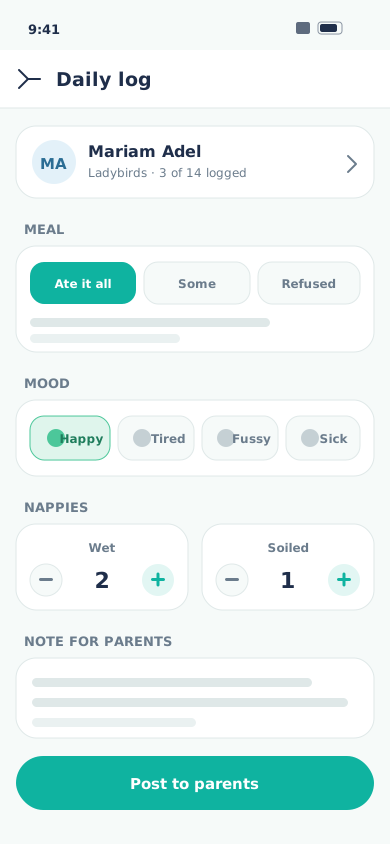
Tap through meals, nappies, naps and mood for a child. It reaches their parents instantly, with no writing-up later.
The teacher app
Meals, naps, mood, attendance and photos, captured one-handed while it happens, not written up at the end of a shift. Parents get it the moment you save it, so there are fewer questions at the door.
The record of a child's day usually lives in three places, none of them designed for a room full of toddlers.
What teachers get
Every action is a few taps, because a tool that needs two hands and a desk does not get used while you are with the children.
Tap through meals, nappies, naps and mood for a child. It reaches their parents instantly, with no writing-up later.
Mark your class present or absent from your phone, and the office sees it the moment it is taken.
Upload straight from the room and tag the children. The photo follows each child, so parents only ever see their own.
Create a trip, a show or a parents' evening for your room, in list or calendar view, without going through the office.
Answer a parent from inside the app. The conversation stays scoped to their child, and your personal number stays yours.
Everyone in your room on one screen, with the profile, allergies and pickup notes you need actually to hand.
Why teachers stay on it
A tool only earns its place in the room if it gives time back rather than taking it.
Questions
Minutes. The teacher app is one screen per task with large tap targets, built for someone standing in a room rather than sitting at a desk. Most teachers log their first full day without training.
The app is a PWA that keeps working through a brief drop and sends what you entered once the connection is back, so a weak signal in a far corner of the building does not lose a log.
No. Teachers reply to parents from inside the app, and personal phone numbers are never shown. Each conversation is tied to a single child, so a message never reaches the wrong family.
You tag the children in a photo, and each parent sees only the photos their own child appears in, plus untagged group photos from that child's current class. Nothing is posted to a shared public feed.
Any modern phone or tablet, iOS or Android, plus the browser on a desktop. There is nothing to install from an app store; teachers open it like a website and add it to their home screen.
Face ID, Touch ID or an Android fingerprint, so there is no password to type between activities. No biometric data ever reaches our servers; it stays on the device.
Book a free demo
We'll walk through the real app (a teacher's morning, a parent's evening, an admin's month-end) and answer the awkward questions about data, privacy law and migration. Like what you see? Take a free trial and run it with your own team, wherever you are.
Prefer email? [email protected]